Archive for July 12th, 2005

Google Sightseeing takes you on tour of the world as seen from satellite, using the free Google Earth program, or Google Maps in your web browser. Each weekday your guides James and Alex present new weird and wonderful sights as suggested by readers.

The editors: James & Alex

Oresund Bridge

Tuesday, 12th July 2005 by James

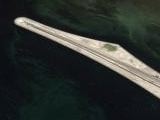
Linking the countries of Sweden and Denmark is the Oresund Bridge which actually comprises a cable-stayed bridge, an artificial island (Peberholm) and a tunnel. The total length is 16km and is split over two levels (a railway is below the road). Marcus Rangell also added:

According to what I’ve read, the island is also a biological experiment to see how nature will develop on the island. Currently a bunch of plants have already spread to the island, some are very rare.

Thanks: Roland, Thomas, breakbeat, jensflorian, Marcus Rangell, Simone, Yann & Martin

Temple of Heaven

by James

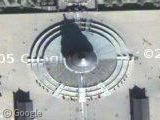
The Temple of Heaven is a temple of Taoism in Beijing. If you zoom out a little you’ll see that the northern section is enclosed in a semi circular wall (representing heaven) while the southern section is within a rectangle (representing earth). The northern part is also higher for the same reason.

To the north is the Hall of Prayer for Good Harvest, which is connected to the Imperial Vault of Heaven by the Vermilion Steps Bridge, or “Sacred Way”. You can see that the sacred way is split into two halves, one side for emperors and the other for princes and high officials, although I think tourists now happily walk up either side. The circles to the south of the Imperial Vault of Heaven is the Circular Altar.

Surrounding the Imperial Vault of Heaven is the echo wall, where apparently if you whisper to the wall on one side the sound is echoed right around the wall to the other side, where you can be clearly heard.

Thanks: Feng Wu

Google Earth Integration Is Go!

by

Google Sightseeing is now fully linked up to Google Earth. Every post now has a ‘Google Earth’ link as well as a ‘Map’ link. Clicking on the Google Earth link will zoom your copy of Google Earth to any of the sights listed in that post. If you don’t have Google Earth installed you can grab it here, Windows only, sorry.

We’ve also made a Google Earth ‘Network Link’ that contains all of our sights which can then be updated from within Google Earth. To use the Network Link grab this KML file. Just click that link and a new ‘Google Sightseeing’ folder will appear in your ‘Places’ section in Google Earth. Give it a minute to load the points and your shiny earth should be populated with our fantastic sights. If you want to check for new points just right click on the ‘Google Sightseeing’ folder and hit refresh to get all the newest points.

There are bound to be a few bugs to iron out so if you spot any post them here. Thanks!